Lab notes
After particles and set dressing, this experiment asks a harder question: can the browser convince you of weight, varnish, and glass—without a ray-traced offline pass? The answer is “sometimes,” if you respect what `MeshPhysicalMaterial` actually models and you feed it a believable environment.
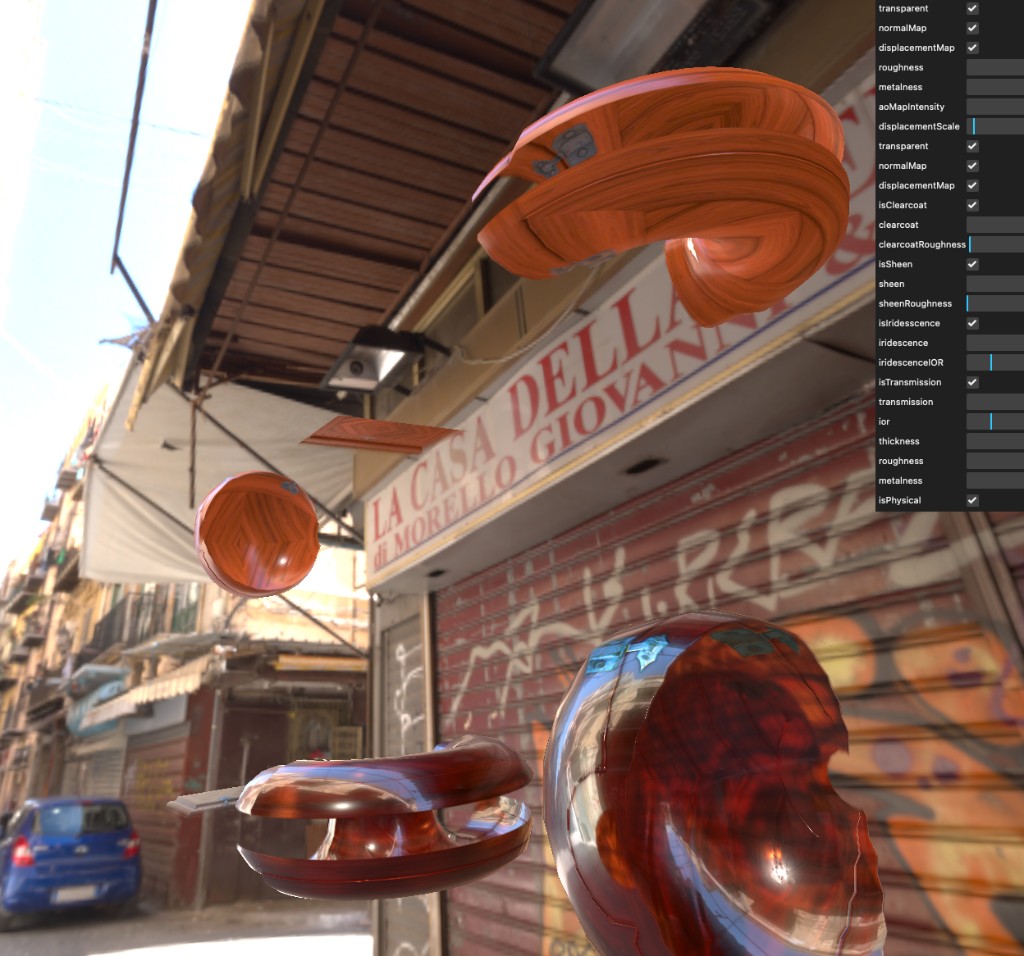
The street in the background is not wallpaper. It is image-based lighting: the reflections on the torus and the tint in the transmission are the same photons, in a sense, as the graffiti on the shutter. When the material lies, it is usually because the HDR was chosen for drama instead of consistency.
Physical material as a stack of phenomena
Roughness and metalness still anchor the base BRDF, but the interesting knobs live above that: clearcoat for a second specular lobe, sheen for fabrics and satin-adjacent surfaces, iridescence for thin-film color shift. Each layer is a contract—turn them on because you see the phenomenon in reference, not because the slider exists.
Normal maps bend the lighting without adding geometry; displacement actually moves the silhouette when you can afford the tessellation. AO darkens creases where bounced light has a harder time reaching. Together they are how you keep meshes simple while the shading pretends the mesh was heavier.
Glass: transmission, IOR, and thickness
Transmission is how Three.js lets light carry through a volume instead of stopping at the first surface. Index of refraction (IOR) controls how aggressively rays bend at the interface—too low and the glass feels like plastic; too high and the world behind it swims.
Thickness gives the renderer a sense of how far light travels inside the solid. Without it, refraction often looks like a sticker. With it, caustic-adjacent behavior starts to read, especially when the environment map has strong contrast—the shop sign and the car paint in the HDR become the “objects” the glass distorts.
Environment maps and bounced light
A good HDR is a cheat code for global illumination on the web. The material does not trace rays into the scene geometry; it samples a pre-convolved environment. That means reflections are only as honest as the panorama and the roughness mip chain.
When materials look “floaty,” the fix is often not another map—it is rotating or tonemapping the env, or grounding meshes with a subtle contact shadow so they stop hovering above the pavement.
Why the GUI is part of the build
Physical parameters interact: clearcoat roughness changes how you read base roughness; transmission fights with opacity unless `transparent` is intentional. A live panel turns that coupling into a conversation instead of a rebuild loop.
The screenshot is busy on purpose—those checkboxes are where we proved which features mattered for this set of meshes. Shipping the controls alongside the scene is how future-you remembers which hacks were load-bearing.
Performance on real hardware
Full physical stacks are not free. Pixel fill cost grows with transmission and transparent overdraw. The lab stays usable by keeping object count modest, reusing materials where possible, and accepting that mobile GPUs will downscale before desktop does.
If you open the demo, start by freezing parameters you do not need, then chase one effect at a time. That is the same discipline we bring to client work: measure, isolate, then polish.